
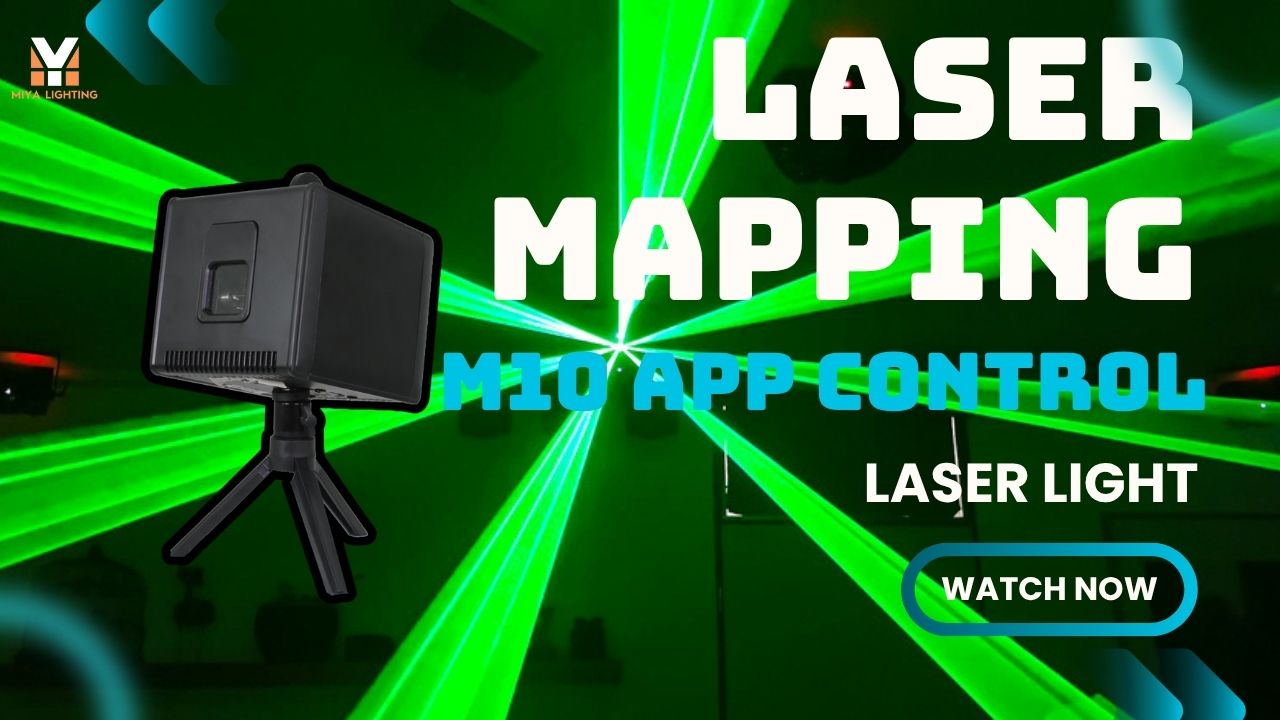
Traditional projection mapping can look impressive, but large video projectors often require considerable space, power, alignment, and darkness. For DJs, event creators, and small venue owners, a portable laser system can offer a cleaner and more flexible alternative.
Laser mapping uses focused beams to draw lines, logos, shapes, and animated patterns directly onto real objects. Instead of filling a surface with rectangular video pixels, a laser projector traces selected edges and details. This creates sharp, high-contrast laser light projections on cars, DJ booths, sculptures, walls, stage props, and building features.
For customers searching for laser projection, laser mapping, or a compact laser mapper, the MIYA M10 provides a practical way to create professional-looking effects without carrying a large video production system.
What Is Laser Projection Mapping?
So, what is laser projection mapping? It is a visual technique that uses a scanning laser projector to follow the shape of a physical object. The system can draw outlines, text, logos, geometric patterns, and animated graphics across a selected surface.
Unlike ordinary lighting, laser mapping does not simply brighten the room. It directs attention to the object itself. A laser can outline a car, trace a DJ booth, highlight a product, or create moving graphics around a sculpture.
Common applications include: DJ booths, Cars and product displays, Wedding backdrops, Birthday parties, Club stages, Art installations,Brand events, Small indoor shows.
This type of laser projection mapping can make a simple object become the visual center of an event.

Laser Mapping vs. Video Projection Mapping
Video projection mapping uses pixels. A video projector sends a rectangular image onto a surface, while mapping software adjusts the image to match the object. This method is excellent for large-scale shows, but it may require high brightness, careful alignment, darkness, and a powerful projector.
Laser mapping works differently. A mapping projector based on laser scanning draws only the lines and shapes needed for the effect. Areas without graphics remain dark, creating a cleaner appearance. This is especially useful for objects with clear edges, curves, and geometric details.
A video projector may create a complete image, while a laser mapper creates focused projection images with strong outlines. For mobile DJs and event hosts, this can mean faster setup, less equipment, and better contrast in smaller venues.
Why Portable Lasers Work Well for Mapping
Portable lasers are compact, focused, and easy to position. You can place the MIYA M10 on a stable stand, aim it toward the target, and adjust the projected lines to match the object.
The laser does not need to cover every part of the surface. It can highlight the most important areas, such as the outline of a car, the front edge of a DJ booth, a stage frame, or a logo behind the performer.
The M10 includes a built-in rechargeable battery that provides approximately two hours of operation on a full charge. With power consumption below 50W, it is practical for mobile event systems and locations where fixed power is inconvenient.
This makes the M10 useful for customers looking for a portable laser projection solution rather than a large projector for mapping.

Recommended Portable Laser for DJs and Parties: MIYA M10
The MIYA M10 Portable Animation Laser Light is designed for DJs, party hosts, mobile entertainers, and small event creators who want custom visual effects in a compact unit.
The M10 produces full-color RGB effects using red, green, and blue laser sources. Available output options range from 300mW to 5W, allowing buyers to select a configuration suitable for their venue and event requirements.
Its 15Kpps galvanometer scanning system helps create smooth lines, simple shapes, text, and animated patterns. The M10 supports standalone operation, mobile APP control, DMX, and ILDA. Beginners can start with simple controls, while advanced users can connect the unit to a larger lighting system.
Through the LightElf mobile APP or WeChat mini-program, users can edit and control effects with iOS or Android devices. The real-time drawing function is useful for creating custom text, lines, shapes, and quick visual effects during an event.
The M10 is suitable for:
DJs, Birthday parties, Private events, Wedding after-parties, Small clubs, Mobile entertainment setups, Brand activations, Portable laser mapping.
MIYA M10 at a Glance
The M10 is a full-color RGB laser projector with a scanning angle of up to ±20°. Its red, green, and blue sources use 638nm, 520nm, and 450nm wavelengths, creating a broad range of colors for graphics and animation.
The unit uses imported semiconductor solid-state lasers and produces a beam with an output size below 8 × 6mm. Beam divergence is below 1.3mrad, helping maintain a focused appearance when projecting patterns onto suitable surfaces.
Control options include standalone modes, the LightElf APP, WeChat mini-program, DMX, and ILDA. The built-in color display provides direct access to settings, while iOS and Android compatibility makes mobile operation convenient.
The M10 accepts DC12V 4A input and consumes less than 50W. It is available from the MIYA US warehouse, with estimated delivery in 2–5 days.

How Galvo Scanning Creates Laser Graphics
Inside a professional laser projector, tiny high-speed mirrors move the beam across the projection area. These mirrors are called galvanometer scanners, or galvos. They move on the X and Y axes, allowing the laser to draw lines, text, shapes, and animation.
Scanning speed affects the smoothness and stability of the graphics. For laser mapping, suitable scanning performance helps create cleaner outlines and reduces broken or flickering lines.
The MIYA M10 uses a 15Kpps galvanometer scanning system with a ±20° scanning angle. It is suitable for portable animation, party graphics, simple mapping outlines, and DJ-focused laser displays.
For large professional productions, higher-speed systems may be preferred. For mobile DJs and parties, the M10 balances portability, creative control, and practical performance.
What Can You Create with Laser Mapping?
Laser mapping is not limited to concerts or large buildings. It can also create strong effects at smaller events.
At a wedding, you can map lines around a backdrop, create a heart animation, or display initials. At a birthday party, you can project names, numbers, and custom symbols. A DJ can outline the booth and add moving effects that match the music.
For brand events, a car, bottle, sign, sculpture, or display wall can become a visual focus through animated laser lines and logo-style graphics.
The M10’s APP drawing function makes it easier to create custom content without preparing a complete computer-based show in advance.
Basic Laser Mapping Setup
A simple setup includes four steps.
First, place the laser projector securely on a stand, truss, or stable mounting point.
Second, choose a target surface with clear edges, lines, or shapes.
Third, adjust the laser output so the lines match the object. Depending on the control method, this may involve drawing, aligning, or programming laser paths.
Fourth, add motion, color, or music-reactive effects.
The M10 can be controlled through the LightElf APP, WeChat mini-program, DMX, or ILDA. Beginners can start with mobile control, while professional users can integrate the unit into a larger lighting system.
For visible beams in the air, use light haze. For stronger contrast, choose a darker background. Never aim laser beams at eye level, and always follow safe laser operation practices.
Is Laser Mapping Good for Beginners?
Laser mapping may sound technical, but beginners can start with simple outlines, text, and shapes. As their skills develop, they can move toward logos, layered animation, and more advanced 3D laser mapping concepts.
The MIYA M10 is beginner-friendly because it offers standalone modes and mobile APP control, while still supporting DMX and ILDA for advanced programming.
Its portable design and built-in battery also make it easy to test in different locations. DJs can use it at home, in a small venue, at a private party, or during a mobile event without setting up a large video projector.

Why Choose the MIYA M10?
The M10 is designed around the needs of mobile entertainment. A DJ may move between venues, while a party host may need to set up quickly. A small event creator may want custom graphics without carrying a full production computer.
The M10 provides: Portable design, Built-in rechargeable battery, Full-color RGB laser output, Mobile APP control, Real-time drawing, DMX compatibility, ILDA support, Standalone operation, iOS and Android compatibility, US warehouse stock for faster delivery.
It can display preset patterns, but it can also become a creative tool for custom visual moments. DJs can draw logos, party hosts can display names, wedding entertainers can create initials, and brand promoters can highlight products with animated outlines.
Final Thoughts
Laser mapping turns physical objects into part of the show. Instead of using heavy video equipment, a portable laser projector can draw clean lines, sharp outlines, custom text, logos, and animated effects onto real surfaces.
For DJs, wedding hosts, event creators, small venues, and brand displays, the MIYA M10 makes laser projection mapping more approachable. It combines RGB laser effects, mobile APP control, real-time drawing, DMX and ILDA support, and built-in battery power in one portable unit.
If you want a visual effect that feels sharp, modern, and different from ordinary party lights, laser mapping is an exciting way to make your next event stand out.

Leave a comment
This site is protected by hCaptcha and the hCaptcha Privacy Policy and Terms of Service apply.