

A great DJ show should feel personal. The music sets the mood, but the lighting gives the room its memory. A sharp laser beam, a moving graphic, a couple’s names on the wall, or a custom DJ logo behind the booth can turn an ordinary indoor event into something guests want to film.
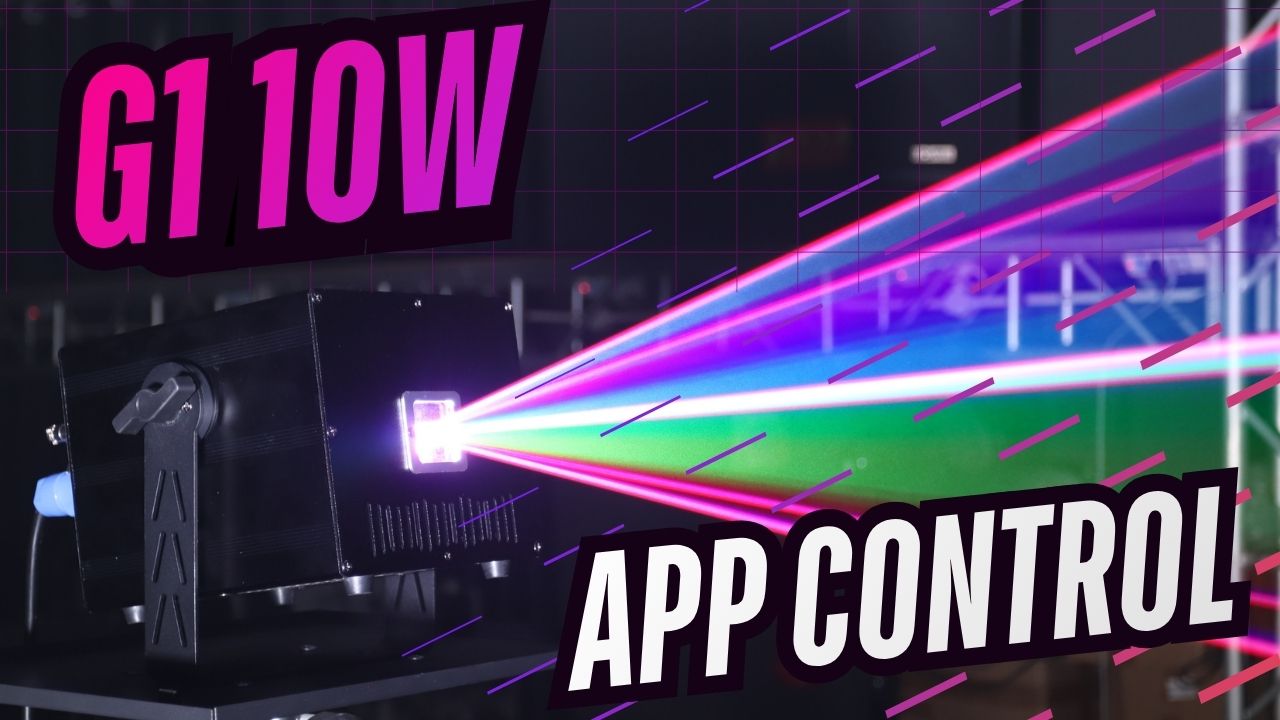
That is what makes the MIYA G1 10W RGB Animation Laser Light different from basic party lights. It is not only made to flash color around the room. It is built for DJs, wedding hosts, private event creators, bars, and small venues that want more control over what the light actually shows.
With the LightElf laser app, the MIYA G1 lets you create text, simple logos, custom drawings, and animated laser effects from your phone. It works as an app controlled laser light for buyers who want a creative indoor show without starting with a full lighting console.
Why DJs Need More Than Basic Laser Beams
Basic laser lights can make a room brighter, but they often do the same thing all night. A few dots, a few beams, maybe some color changes. That can work for a simple house party, but it does not always feel special for a paid DJ event, wedding reception, bar night, or private celebration.
An animation laser light gives the room more personality. Instead of only sending random beams into the air, it can create movement, shapes, text, and graphic-style effects. This gives DJs and event hosts more ways to match the lighting to the moment.
A birthday party can show a name. A wedding after-party can feature initials or a short message. A DJ can display a logo or visual signature behind the booth. A bar can create a stronger club-style atmosphere without installing a full lighting system.
That is where the MIYA G1 becomes useful. It gives indoor events a more custom look without making the first setup too difficult.

Create Text and Logos with a Laser Light App
One of the strongest reasons to choose the MIYA G1 is phone-based creativity. With the laser light app, users can create text, control built-in effects, and work with simple logo or drawing-style visuals directly from a mobile device.
For many buyers, this is the feature that makes the product feel practical. You do not need to start with a large lighting console just to create a more personal laser effect. A mobile DJ can prepare a simple name or message before an event. A wedding DJ can add a couple’s initials. A private party host can create a birthday greeting. A small venue can add a brand-style visual behind the DJ booth.
For iPhone users, the laser light app for iPhone makes the G1 easier to manage during an event. For Android users, the laser light app for Android gives the same idea: simple control from the phone, while the real laser effect comes from the MIYA G1 projector.
This makes the G1 more than a regular DJ laser light. It becomes a creative laser light projector app experience for indoor laser shows.
Custom Drawings for Weddings, Birthdays, and Private Events
Personal details make events feel more expensive, even when the setup is simple.
For weddings, the MIYA G1 can help create a more memorable dance floor moment. Instead of using only regular DJ lights, you can project names, initials, hearts, simple graphics, or animated effects during the reception or after-party. It adds a custom touch without needing a large production team.
For birthdays and private events, custom drawings and text can make the room feel planned, not generic. A simple “Happy Birthday,” a name, or a themed graphic can become the photo-worthy detail that guests remember.
For DJs, this is also a way to stand out. Many DJs play good music. Fewer DJs bring a visual setup that feels branded, personal, and easy to recognize in videos. A DJ laser light with app control gives your setup a signature look without making every event feel like a technical production.

A 10W RGB Animation Laser for Strong Indoor Impact
The MIYA G1 is built with 10W RGB laser power, giving it the brightness and color range needed for stronger indoor effects. Red, green, and blue laser output allows the projector to create full-color beams, animations, and graphic-style visuals that look more vivid than simple single-color party lasers.
In a dark room with light haze, the laser beam becomes much more visible in the air. Patterns feel sharper. Movement feels cleaner. The dance floor looks more active.
This makes the G1 a strong fit for indoor DJ shows, bars, lounges, wedding after-parties, private event rooms, small stages, theaters, and entertainment venues. It is especially useful when you want one projector that can create both beam effects and personalized animation.
For buyers looking for an RGB laser light app setup or a laser light show app experience, the key is choosing a real projector with app control. The app gives you control. The MIYA G1 creates the actual laser show.
When to Use App, Auto, DMX, or ILDA
The best control mode depends on how you plan to use the laser.
Use App Control when you want the fastest and easiest way to create text, control effects, and manage the laser from your phone. This is ideal for mobile DJs, wedding DJs, small parties, and private events.
Use Auto Mode when you need quick background energy and do not want to spend time programming. It is a good option for simple parties, bar nights, or events where you need the laser to run smoothly with minimal setup.
Use DMX when you want the G1 to work with your other DJ lighting equipment, such as moving heads, strobes, wash lights, or LED fixtures. DMX is useful for DJs and venues that want more synchronized lighting scenes.
Use ILDA when you are working with professional laser software and external control hardware, such as FB3 or FB4-style systems. ILDA is better for advanced users who want more detailed programming, custom laser content, and professional show control.
The advantage of the MIYA G1 is that you do not have to choose only one path. You can start simple with the app and upgrade your control style as your events grow.

Why MIYA G1 Is Practical for Real Buyers
Many shoppers want a better laser show, but they do not want a product that feels too technical before they even start. The MIYA G1 solves that problem by combining creative app control with professional connection options.
For a beginner, it feels approachable. For a mobile DJ, it saves setup time. For a wedding or private event, it adds custom moments. For a bar or small venue, it creates a stronger indoor atmosphere. For advanced users, DMX and ILDA support make it more flexible than a basic party laser.
That balance is what makes the G1 a smart choice for buyers who want more than color beams. It is for people who want their laser light show to say something, show something, and feel connected to the event.
Indoor Use Reminder
The MIYA G1 is designed for indoor use. It is a great fit for clubs, bars, lounges, wedding venues, private event rooms, theaters, DJ sets, and small indoor stages. For outdoor events, rain, moisture, and humidity require a weather-rated MIYA outdoor laser projector instead.
Choosing the right model for the right environment helps protect the equipment and keeps the show reliable.
Final Thoughts
The MIYA G1 is not just another DJ laser light. It is an app-controlled animation laser light built for people who want to create.
From custom text and simple logos to drawings, RGB laser effects, and animated DJ visuals, the G1 helps turn a phone into a creative control tool for indoor laser shows. New users can start with the LightElf app or Auto mode, while experienced DJs and event teams can move into DMX or ILDA workflows when they need more control.
For weddings, birthdays, bars, private events, and mobile DJ setups, the MIYA G1 gives buyers a more personal way to light the room—and a more memorable reason for guests to keep watching.

Leave a comment
This site is protected by hCaptcha and the hCaptcha Privacy Policy and Terms of Service apply.