
Your wash lights bring color to the room. Your moving heads add movement. Yet when you look at the complete setup, you may still want something more distinctive: defined lines, animated graphics, or a personal message that connects the lighting to the occasion.
Adding DJ laser lights gives you another visual tool to work with. The best starting point is deciding what they should contribute to your existing DJ equipment. With the MIYA MY7-Pro, you can select patterns, project text, and turn simple images into laser graphics through your phone.
Give Your DJ Lights Different Jobs
A balanced DJ lighting arrangement gives each fixture a purpose. Wash lights establish background color, moving heads create changing accents, and laser graphics introduce outlined shapes or a recognizable focal point.
Before adding more effects, watch your current setup from the audience position. Identify where the room needs visual interest and where it already feels busy. You might find that one clear projection area adds more character than another fixture sweeping across the same space.
Your DJ lights do not need to operate at full intensity throughout the event. Leaving room for individual effects helps guests appreciate the differences between them.

Create a Clear Area for Laser Graphics
Choose an uncluttered wall or designated backdrop for text and animations. An even, matte surface is a useful starting point because windows, mirrors, and changes in surface depth can interrupt the image or cause unwanted reflections.
Check where your existing lights are aimed. A bright wash falling directly onto the projection area can reduce contrast. Adjust the surrounding fixtures so your DJ laser projector has a suitable background while the rest of the room remains appropriately illuminated.
Test the image at the size you intend to use. Enlarging a pattern may make it cover more space, but that does not automatically make it easier to see.
Understand Beams and Surface Projections
When shopping for laser lights for DJs, distinguish between airborne beam effects and graphics projected onto a surface. They create different visual experiences and need different conditions.
Haze can make a laser beam more visible in the air, where haze use is permitted by the venue. Names, messages, and recognizable graphics need a suitable projection surface. Footage recorded in a dark, haze-filled room will not represent how text looks on a brightly illuminated reception wall.
Ask for demonstrations that match the effect you want. This helps you choose equipment and plan the room around realistic expectations.

Add Personal Messages from Your Phone
Personal content can make a lighting upgrade feel relevant to the celebration. For a birthday, project the guest of honor’s name. At a wedding reception, display the couple’s first names or a brief welcome. For a DJ performance, use your stage name or the event title.
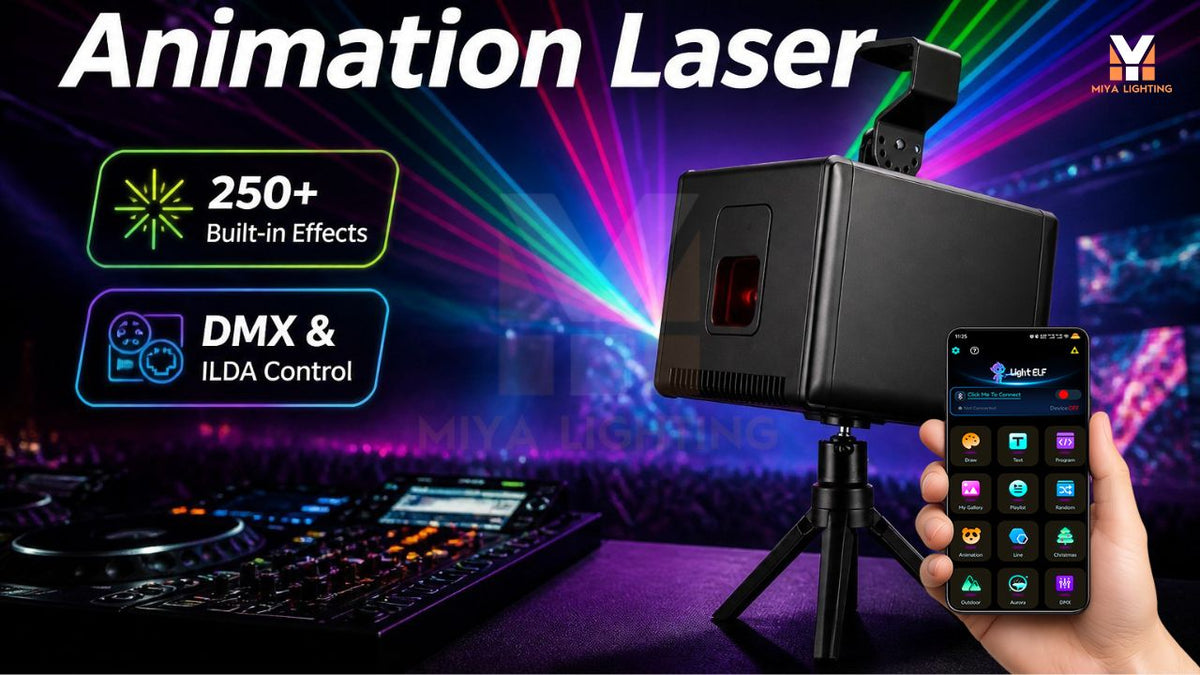
The MIYA MY7-Pro supports text projection through the LightElf app on iPhone and Android. Enter your wording, check the spelling, and test the result on the chosen backdrop. Short messages leave more room for readable letters.
Pair a screenshot of the phone’s text input with a photograph of the corresponding projection. Keeping the wording identical makes it easy to see how an idea becomes part of the room. It is also a useful way to show a proposed display to a client or venue.
Build a DJ Laser Light Show Around the Event
A thoughtful DJ laser light show can change as the evening progresses. Start with a welcome message during arrivals, choose animations for the celebration, and introduce geometric effects when dancing begins.
Select a few complementary patterns instead of constantly switching between unrelated content. Coordinate those choices with your existing DJ lights, allowing quieter moments as well as energetic ones.
The MY7-Pro lets you preview and select all 180 geometric patterns and 60 animation groups directly in the app. You can explore the library visually, then check your favorites in the actual space. Image recognition adds another option for simple graphics that fit an event theme.

Choose How to Control Your DJ Laser Lights
Smartphone control provides a direct way to select patterns and change text. You can prepare ideas during setup and manually choose content when the moment calls for it.
For a more structured DJ lighting setup, the MY7-Pro also supports DMX and RJ45 ILDA connections. Confirm the required controllers, adapters, and supported functions before buying accessories.
App operation does not automatically synchronize the projector with other fixtures. Decide whether independent operation suits your workflow or whether you need an external system for coordinated cues. This choice affects both your equipment list and the time needed to prepare a show.
Plan a Practical Installation
Portable DJ equipment should fit your transport routine and the venue. The MY7-Pro’s built-in battery offers flexibility when planning placement, but check expected runtime, charge it before use, and account for any external control cables.
Secure the projector, maintain ventilation, and follow the manufacturer’s laser safety instructions and applicable local requirements. Keep direct beams away from people and reflective surfaces, using a controlled beam path throughout the event.
If you are considering DJ laser lights for your next upgrade, start with one effect your current fixtures cannot provide. Explore the MIYA MY7-Pro DJ laser projector to add personal messages, geometric patterns, and simple graphics to your existing setup.

Leave a comment
This site is protected by hCaptcha and the hCaptcha Privacy Policy and Terms of Service apply.