
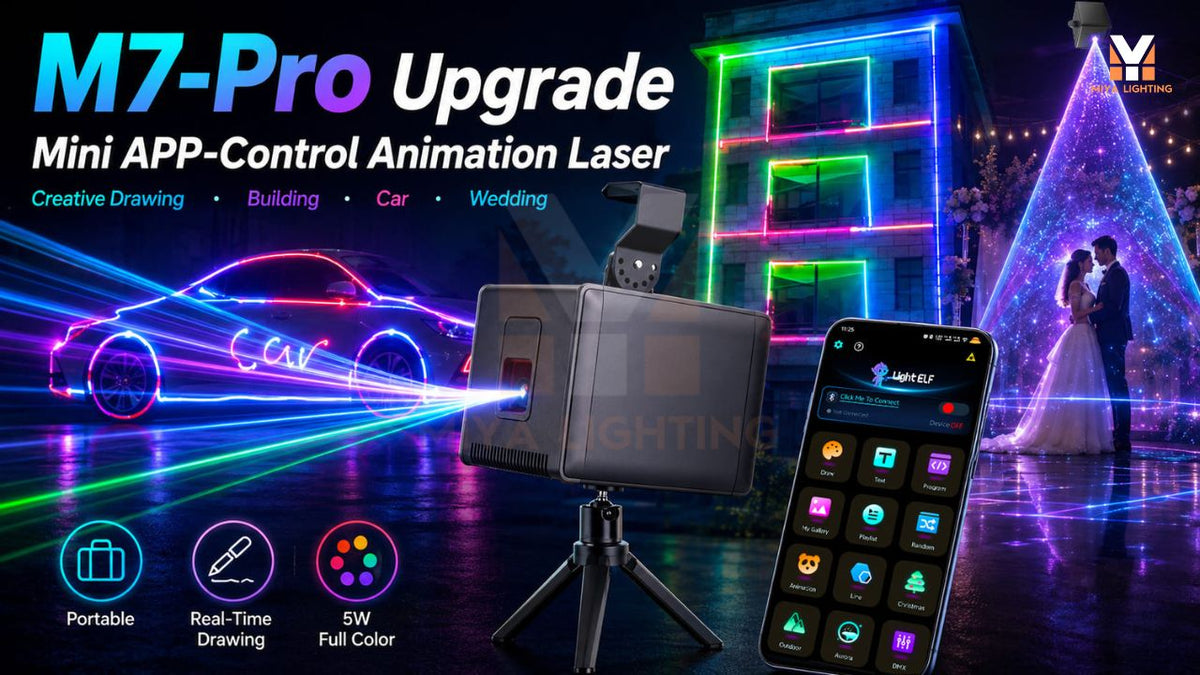
The tree is decorated, your holiday playlist is ready, and friends will arrive soon. An open wall near the gathering area offers a chance to add something personal: a welcome message and festive animations that make the space feel ready for your celebration.
Combining Christmas party lights with projected content gives that wall a purpose. A Christmas light projector can add changing designs without covering the backdrop in more physical decorations. With the MIYA MY7-Pro, you can preview patterns, enter text, and select effects from your phone.
Choose a Clear Area for Your Backdrop
Start with an uncluttered wall or a suitable matte backdrop. A relatively flat, light-colored surface gives outlined animations and text a useful background. Windows, mirrors, and changes in surface depth can interrupt the image or create unwanted reflections.
Choose an area guests can see comfortably from the gathering space while remaining outside the beam path. Move furniture or decorations that would block the projection before installing the equipment.
Your Christmas light projector does not need to fill the entire wall. A smaller image with space around it can look more balanced and leave room for garland, string lights, and other seasonal details.

Frame the Projection with Christmas Party Lights
Arrange warm string lights around the edges of the backdrop. Garland can help define the frame, while a decorated table nearby connects the display to the rest of the room.
Keep the central projection area open. Dense decorations behind lettering can make the words harder to read. Bright lamps aimed at the same surface may also reduce contrast, so position your Christmas party lights to support the scene.
View the arrangement from across the room. The decorations provide a consistent frame, while your Christmas projector lights introduce movement and personal content.
Write a Holiday Welcome on Your Phone
A short greeting makes the backdrop feel like part of your gathering. Try “Merry Christmas, Friends,” “Christmas at the Millers,” or a simple name for your annual holiday party.
The MIYA MY7-Pro supports text projection through the LightElf app on iPhone and Android. Follow the connection instructions, open the text function, and enter your wording. Check spelling and punctuation before testing the result.
Keep the message brief enough to read at a glance. Adjust the available settings and check the words from the intended viewing position. A clear greeting gives your Christmas light projector an immediate role as guests arrive.
For a useful demonstration, pair a screenshot of the phone’s text input with a photograph of the matching projection. Show identical wording so the connection between the app and the display is easy to understand.

Select Christmas Animations That Fit Your Decorations
Once your greeting is ready, browse the MY7-Pro’s Christmas animation patterns. Preview the available designs on your phone and test a few that complement the room.
The app lets you preview and select all 180 geometric patterns and 60 animation groups. Visual browsing helps you find content without relying only on pattern numbers.
Choose a focused selection for your laser Christmas lights. A few complementary effects can give the backdrop a consistent look throughout the evening. Check each animation on the actual wall, because the phone preview cannot show how surface texture and surrounding brightness will affect it.
Add a Simple Seasonal Graphic
For another personal detail, explore the MY7-Pro’s image recognition feature. A simple source image can become a line-based laser graphic that fits your theme.
An uncomplicated tree or gift outline is an idea to test. Choose bold shapes with minimal detail, using artwork you own or have permission to use. Photographs, shading, and intricate textures will not translate directly into the same type of projected image.
Review the recognized graphic and simplify the source if necessary. This gives your holiday laser lights another creative use alongside ready-made animations and text.

Plan a Christmas Light Show for Different Moments
Think about how the party will unfold. Display a welcome message during arrivals, select Christmas animations while everyone mingles, and introduce geometric effects when the music becomes more energetic.
A Christmas light show can be a small collection of deliberate changes. You can select content manually through the app when the moment calls for it, rather than spending the evening browsing the entire library.
Return to the greeting later if you want a familiar visual element. Planning a few choices in advance lets your Christmas projector lights contribute to the atmosphere while leaving you time to enjoy hosting.
Test the Complete Display Before the Party
Turn on the decorations and room lights you expect to use during the gathering. Check the text and animations again, then adjust competing lighting while keeping walkways appropriately illuminated.
The MY7-Pro includes a built-in battery, offering flexibility when arranging the equipment. Confirm runtime for your intended settings, charge it beforehand, and follow installation instructions for secure mounting and ventilation.
Follow the product’s laser safety instructions and applicable local requirements. Maintain a controlled beam path away from people and reflective surfaces. Keep this backdrop as a display area that guests view from outside the projection path.
Bring Your Holiday Backdrop Together with MIYA
A clear wall, a frame of string lights, and thoughtfully chosen content can turn an unused space into a festive focal point. Personal greetings and animations give you ways to refresh the display throughout the celebration.
Explore the MIYA MY7-Pro Christmas light projector to combine app-controlled text, full pattern previews, and RGB effects with your existing Christmas decorations.

Leave a comment
This site is protected by hCaptcha and the hCaptcha Privacy Policy and Terms of Service apply.