
A birthday name on a backdrop, a welcome message at a wedding, or animated graphics behind a DJ booth—personalized lighting can make an event feel more thoughtfully planned. With app-controlled laser lights, you can select effects and create content from your phone.
Before ordering, it helps to understand how the projector will fit your space and plans. Phone compatibility, power, content features, and installation all matter. This laser projector buying guide explains what to check, using the MIYA MY7-Pro as a practical example.
Will the Laser Light App Work with Your Phone?
Start with the app itself. Ask for its exact name, supported operating systems, and download instructions. Confirm compatibility with your particular phone, including any minimum iOS or Android version requirements.
The MIYA MY7-Pro works with the LightElf laser light app on iPhone and Android. Follow the supplied instructions for connecting your device, and ask for a demonstration if you want to understand the process before purchasing.
Also check whether the functions you need require internet access. A clear connection demonstration tells you more than a general promise of wireless control. You should know how to select content, make changes, and stop projection before your first event.

Can You Preview All the Built-In Patterns?
A large library is more useful when you can see what you are choosing. When comparing app controlled laser lights, ask whether the app previews every built-in pattern or only a selection.
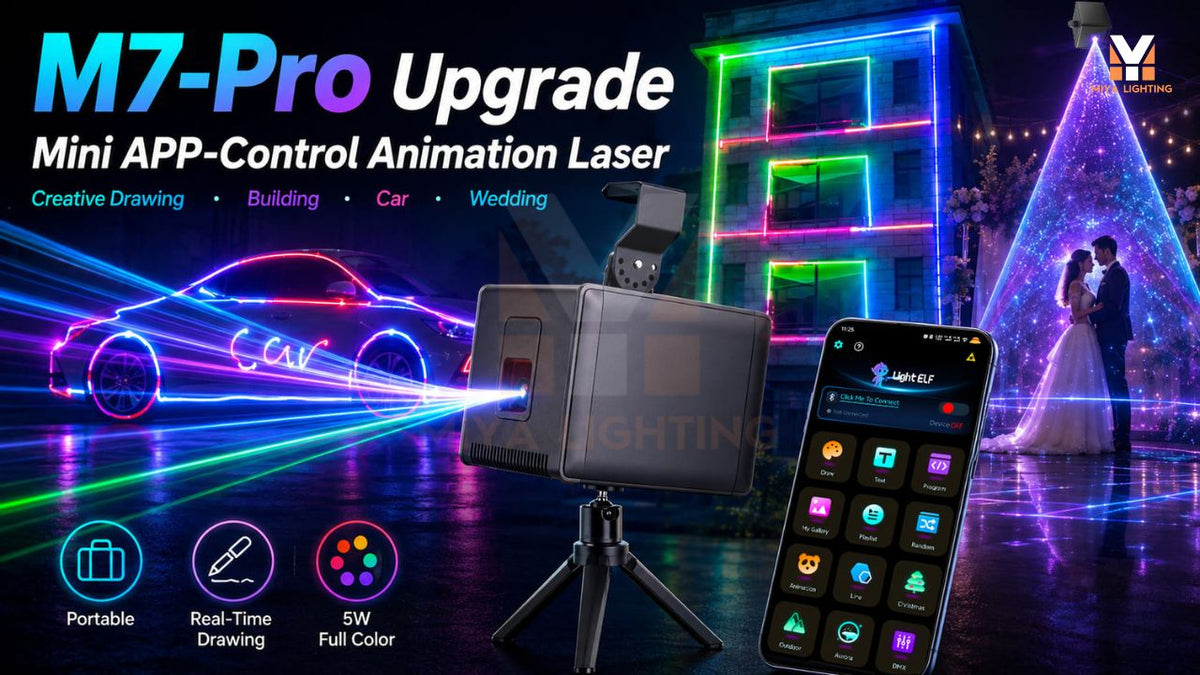
The MY7-Pro lets you preview and select all 180 geometric patterns and 60 animation groups directly in the app. You can browse visually and find effects suited to a celebration or DJ performance.
Request footage showing both the phone interface and the actual projection. The preview helps you choose content; the projected result shows how it appears under real conditions.
Can You Create Names, Messages, and Simple Graphics?
App control does not mean the same thing on every product. Some apps select preset effects, while others also offer text projection, drawing, or image recognition. Check the specific creative functions before choosing a laser animation projector.
The MY7-Pro supports text projection and simple image recognition. You can enter a personal greeting or use a simple source image to create a line-based laser graphic.
For birthdays, try a first name and a short greeting. For weddings, consider the couple’s names or a welcome message. Keep image designs simple, with clear outlines and limited detail. Confirm support for any special characters or languages you intend to use.

What Will Your Content Look Like at the Venue?
Ask for a demonstration that resembles your intended setup. A close-up promotional image may not reveal the projection distance, image size, or surrounding brightness.
One useful comparison pairs the phone’s text input screen with a photograph of the corresponding projection. Use identical wording in both images, such as a birthday greeting or DJ name. This makes it easy to understand what the text feature delivers.
If you are comparing DJ laser lights, request examples from realistic venue conditions. Surface graphics and airborne beam effects are different presentations. A haze-filled demonstration does not show how text will look on a brightly illuminated wall.
What Power Supply and Battery Runtime Do You Need?
Check the required power supply and whether the correct adapter is included. For a battery-powered model, ask about charging time, expected runtime, and whether operation while charging is supported.
The MY7-Pro includes a built-in battery, offering flexibility when planning placement. However, confirm runtime for your intended settings rather than assuming one figure applies to every use.
For mobile performers, power planning belongs alongside the rest of the DJ equipment checklist. Consider setup time, event duration, charging access, and your backup arrangements. A portable design is most useful when it fits the complete working routine.

Will Phone Control Be Enough?
If you want to select patterns and change text manually, smartphone operation may suit your needs. If you plan to coordinate the projector with other fixtures, investigate external control options before purchasing.
The MY7-Pro supports DMX and RJ45 ILDA connections alongside app and standalone operation. Confirm compatible controllers, cables, adapters, and software, as well as the functions available through each connection.
A DJ laser projector should fit the way you intend to run the show. App control does not automatically synchronize it with your existing lights. Likewise, an RJ45 connector does not automatically indicate standard Ethernet networking.
Can You Install the Projector Properly?
Identify a secure installation position and a suitable projection area before ordering. Text and graphics need an appropriate surface, while ventilation and cable access affect where the fixture can operate.
When choosing laser lights for DJs, discuss the proposed arrangement with the venue. Confirm environmental suitability and any restrictions on haze. Battery power does not establish weather resistance.
Follow the manufacturer’s laser safety instructions and applicable local requirements. Maintain a controlled beam path, prevent direct exposure to people, and account for reflective surfaces.
Choose App-Controlled Laser Lights Around Your Plans
The right purchase begins with the content you want to create and the conditions where you will use it. Request realistic demonstrations, clear compatibility information, and a complete list of required accessories.
Explore the MIYA MY7-Pro app-controlled laser lights for full pattern previews, personal text, and simple graphics. Share your phone model, venue details, and preferred effects with MIYA to discuss a suitable setup before ordering.

1 comment
Grace
I really enjoy this template youve got going on on your web
site. What is the name of the theme by the way?
I was thinking of using this style for the web site I am going to create for my class
project.
My site :: Sklep SEO
Leave a comment
This site is protected by hCaptcha and the hCaptcha Privacy Policy and Terms of Service apply.